Timelapse & Monitoring Cloud · Android · Long Term · Remote Control · Waterproof
Turn any Android device into a remotely controlled camera for unattended, long-term monitoring and timelapse video production. Ideal for worksites and long lasting projects.
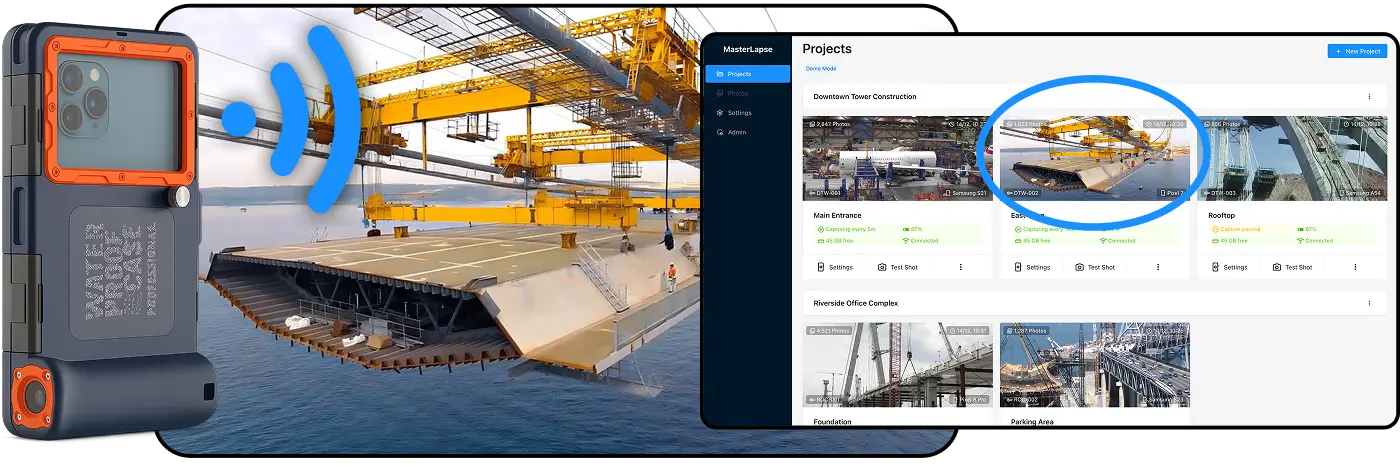
How It Works
Get started in 2 minutes
Install the App
Download the app on any Android smartphone and enter the 6-digit code from your dashboard.
Configure Remotely
Set capture intervals, schedules, and camera settings from any browser. Changes sync instantly.
Monitor, Play & Share
Watch your timelapse grow in real-time. Browse thousands of photos smoothly or scrub through like a video.
Features
Never Miss a Capture
- 24/7 operation without intervention
- Auto-restart after any interruption
- Guided setup for every phone brand
- Auto-protection from low battery and storage
The device captures autonomously even after reboots or updates. The system restarts itself in any scenario. Built-in instructions guide optimal configuration for every phone brand, ensuring uninterrupted operation for weeks or months.
Manage Your Timelapse from Anywhere
- Complete configuration from browser
- Test shot with instant preview
- Real-time synced changes
- No physical access to device required
Adjust intervals, camera settings, and schedules directly from your browser. Take a test shot to verify framing and exposure without touching the phone. Perfect for devices in remote or hard-to-reach locations.
Professional Image Quality
- Auto-optimization for sharp photos
- Advanced low-light mode
- RAW capture for post-production
- Lens selection (wide, normal, tele)
Advanced algorithms automatically optimize settings to minimize noise, especially in low light. RAW capture enables professional editing. Fine-tune every parameter from the remote panel.
Capture Only When Needed
- Intervals from 10 seconds to hours
- Day of week selection
- Multiple time slots
- Different schedules per day
Configure captures only during work hours, exclude weekends, or create different schedules for each day. Save storage and battery by capturing only during relevant moments.
Always Know Your Project Status
- Visual timeline of captures (ok/missed)
- Automatic problem explanation
- Real-time connection status
- Critical situation alerts
The timeline shows the last 7 days at a glance. One click reveals why a capture was missed. Color-coded alerts immediately signal problems: low battery, full storage, device offline.
Relive Months of Work in Seconds
- Smooth handling of 20,000+ images
- Three viewing modes
- Video-like player for quick scrubbing
- Instant image loading
Scroll smoothly through thousands of photos without lag. The player turns your captures into an interactive video: drag the slider to see weeks of progress in seconds.
One System, Endless Projects
- Multiple viewpoints per project
- Dedicated access per device
- Revoke access if lost
- Group settings with one click
Manage multiple projects with multiple viewpoints simultaneously. If a phone is lost, revoke access instantly. Apply the same settings to all cameras in a project together.
Built for Real-World Use
- Automatic data protection
- Smart suspension before problems
- Auto-retry on errors
- Automatic resume after disconnections
The system protects itself and your data: suspends captures before battery runs out, avoids filling storage completely. When connection returns, everything resumes without intervention.
Know Exactly What's Happening
- Battery level and charging
- Available storage
- Connection quality
- App status
A dashboard shows all vital parameters of the remote device in real-time. Verify it's charging, has enough space, that the connection is stable. Detect if someone closed the app or if the phone entered power saving mode.
From Download to First Capture in 2 Minutes
- 6-digit code to connect device
- No registration on phone
- Auto-detection of camera features
Install the app, enter the code from the dashboard, the device is operational. No complex configuration. The system automatically detects camera capabilities and shows only available options.
Frequently Asked Questions
What phones are supported?
Does the phone need to stay connected?
How long can the phone capture?
Can I use an old phone?
What about storage limits?
What Our Users Say
"We've been monitoring our construction site for 6 months without a single interruption. The auto-restart feature is a lifesaver."
"Being able to check on our projects from anywhere and adjust settings remotely has transformed how we document our work."
"The image quality is impressive for a smartphone-based solution. Our clients love the timelapse videos we create."